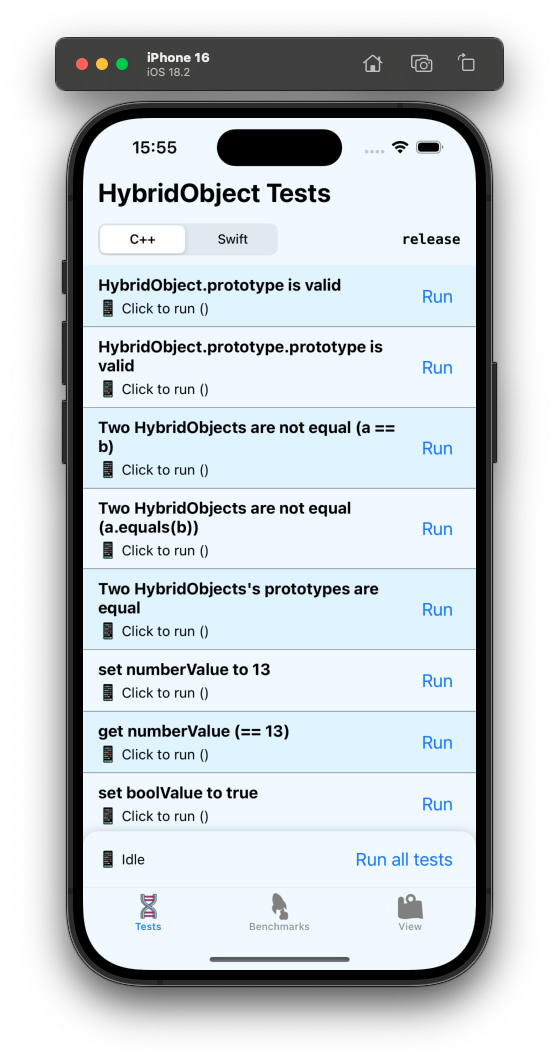
Running the Example app
This guide will help you understand the Nitro Example app's role, and teach you how to run it both in debug and in release.
The Example app's purpose
Nitro's development always targets the example app (under tests/react-native/apps/example/). It narrows down user bugs by the following criteria;
- If you have a bug in your code, but the same code works in the Nitro example app, it's a user error and won't/can't be fixed.
- If you have a bug in your code that can also be reproduced inside the Nitro example app, it's a Nitro bug, which might get fixed in a future PR.
A bug report will only be taken seriously when there is a clear reproduction, and you can also reproduce the same bug in the example app. Anything else is considered a user error and will be closed.
The example app contains 4 screens;
- A "Tests" screen where over 170 different test cases for Nitro Modules are covered.
- A "Benchmarks" screen where a simple Nitro Module is benchmarked against a Turbo Module.
- A "Views" screen where hundreds of Nitro Views mount and unmount periodically.
- A "Eval" screen where you can run custom code using Nitro APIs.
These should allow you to test all Nitro features in a single app, which is useful for finding bugs or regressions - e.g. by running specific code and comparing results with older versions of the example app.
Run the pre-built example app (release)
Each release of Nitro contains a pre-built release version of the Nitro Example app. You can download the pre-built .app/.apk from the latest Nitro release, and run it on your iOS Simulator, or Android Simulator/Device.
iOS
Simulator
To run the iOS app, first start an iOS Simulator;
open -a Simulator
Then, simply drag the .app into the Simulator's window.
Android
Emulator
To run the Android app, start an Android Emulator;
emulator -list-avds
emulator -avd <name>
Then, simply drag the .apk into the Emulator's window.
Device
To run the .apk on a physical Android device, simply download the .apk from the GitHub releases on your phone, and open it. Your OS will install & run it.
Build the example app yourself (debug)
To run the example app yourself, make sure you have a working React Native environment set up, and have installed Bun.
Then, simply clone (potentially also fork?) the Nitro repository and install its dependencies:
- macOS
- Windows/Linux
git clone https://github.com/margelo/nitro
cd nitro
bun bootstrap:ios
iOS
To run the iOS app of Nitro Example, open tests/react-native/apps/example/ios/NitroExample.xcworkspace in Xcode, and hit run.
The bun bootstrap:ios command builds the local workspace packages and installs the example app’s Pods.
Android
To run the Android app of Nitro Example, first open Android Studio:
open -a "Android Studio"
Then, open tests/react-native/apps/example/android/ in Android Studio.
git clone https://github.com/margelo/nitro
cd nitro
bun bootstrap
Android
To run the Android app of Nitro Example, first open Android Studio:
open -a "Android Studio"
Then, open tests/react-native/apps/example/android/ in Android Studio.
Reproducing bugs
The Nitro repository uses the nitrogen CLI and contains these test packages:
tests/standalone/nitro-test: TestObject specs, generated bindings, and C++/Swift/Kotlin implementations.tests/standalone/nitro-test-external: Types and HybridObjects used to test cross-library imports.tests/standalone/test-runner: JavaScript behavior tests, Hermes host, Swift Testing, and JUnit suites.tests/react-native/packages/react-native-nitro-test: Benchmark objects and View fixtures for the React Native apps.
Use these packages to reproduce bugs in Nitro. Add HybridObject regressions to the standalone suite and View or React Native integration regressions to the example app's Harness tests. A draft PR with a minimal failing test gives maintainers a runnable reproduction.
Changing specs
After changing a Nitro spec, regenerate bindings from the repository root:
bun specs
This runs nitrogen for the React Native fixture package and both standalone packages. Reinstall pods if the React Native iOS files changed:
bun example pods
Then simply run again.